Key Takeaways
LegalTech platforms fail adoption not because lawyers distrust technology — but because the products look and behave like they were designed for someone else. ClauseGuard was built with a user research foundation that put practicing attorneys in every design decision from day one.
Choosing web and design services that understand institutional trust signals — not just modern SaaS aesthetics — is the difference between a legal platform that converts at demo and one that collects dust after procurement.
In our internal analysis of six enterprise SaaS platforms delivered by Phenomenon Studio between 2022 and 2025, products that launched with a fully integrated design system averaged 2.8× lower post-launch UI defect rates than those that launched without one.
ClauseGuard's daily active user rate was 4.1× higher at 90 days than the client's previous compliance tool — despite ClauseGuard having fewer total features at launch. Adoption is a UX problem before it is a features problem.
I want to start with an observation that runs against what most legal technology companies spend their engineering budget on. The reason law firms and compliance teams do not adopt new digital tools is almost never the feature set. It is the first ten minutes. The moment a practicing attorney opens a new platform and feels — not thinks, feels — that it was designed for a startup pitch deck rather than a 60-hour work week, the mental door closes. Getting it back open costs more than building the right experience from the start.
ClauseGuard is a contract analysis and regulatory compliance platform built for mid-size law firms and in-house legal teams operating across multiple jurisdictions. When the founding team came to Phenomenon Studio in Q1 2024, they had a validated problem, a clear user archetype, and a pitch that had already generated signed letters of intent from three law firm partners. What they did not have was a product. What we built together over the following 14 weeks is the subject of this piece.

How Phenomenon Studio takes enterprise SaaS products from brief to deployed — web app design, brand identity, and front-end development in one integrated process.
Who ClauseGuard Was Actually Built For — and Why That Question Took Three Weeks to Answer
In my project records, the ClauseGuard discovery phase is notable for one specific finding: the founding team's assumed primary user and the actual primary user were two different people. The founders had designed their pitch around senior partners — the decision-makers who would approve the procurement. The actual daily users, we discovered through structured interviews with 26 attorneys across four firms, were junior associates and paralegals doing document review at volume.
This is not an unusual finding. It is, however, a finding that completely restructures a product's information hierarchy. A senior partner who opens the platform twice a week for a high-level compliance overview needs a fundamentally different dashboard than a paralegal who is processing 40 contracts per shift and needs to flag issues for escalation without breaking their review rhythm. We designed for both — but we designed the primary interface for the paralegal first, and built the partner-level reporting view as a genuinely separate experience rather than a collapsed version of the same screen.
What is the right starting point when designing a dashboard UI for legal professionals?
The right starting point is a task frequency analysis — not a feature list. Map what the user actually does in a typical session (by role, by time of day, by urgency level) and design the information hierarchy around that map. For ClauseGuard's paralegal user, the most frequent task was flagging potentially non-compliant clauses for attorney review. That action needed to be completable in two clicks from anywhere in the document view. Every other dashboard element was organized around keeping that path clear.
Brand Identity for a Sector That Has Not Changed Its Visual Language Since 1987
Legal technology has a specific branding problem that most agencies misunderstand. The sector is full of tools that look either like enterprise legacy software (gray, dense, institutional) or like consumer fintech apps (bright, rounded, friendly). Neither extreme works. The first signals "this will take six months to implement." The second signals "this was built by people who have never worked in a law office."
Working with the ClauseGuard founders, we developed a visual identity positioned precisely between those two poles. The brand identity used a restrained serif-based wordmark — Freight Display, specifically — combined with a dark-parchment neutral base palette and a single controlled accent color (a deep teal used exclusively for interactive elements and system feedback). No gradients. No illustration. Photography only in documentation contexts, never decorative. The result was a product that read as serious professional software to the attorney making the adoption decision, and as genuinely modern enterprise software to the IT administrator reviewing the security documentation.
This kind of deliberate brand positioning does not happen by feel — it happens through competitive visual audits, user perception testing at the mockup stage, and a clear brief about what the brand must communicate and what it must avoid. Those are the methods we use at Phenomenon Studio when building brand identity design services for enterprise clients in regulated industries. The aesthetic outcome is secondary to the trust outcome it is designed to produce.

ClauseGuard's compliance review dashboard and document flagging interface — designed by Phenomenon Studio for two distinct user archetypes operating from the same platform.
4.1× higher daily active user rate vs. client's prior compliance tool at 90 days
52% reduction in time-on-task for primary compliance review workflow
14wk zero-to-production delivery including brand identity and AI integration
The AI Chatbot Layer: Useful Tool, Not Magic Oracle
ClauseGuard's AI layer was the part of the brief that required the most careful scoping conversation. The founders wanted an AI that could "analyze contracts and identify compliance issues." That capability is real and achievable. The question is what it means to surface AI findings inside an interface used by legal professionals whose professional liability is attached to the advice they give clients.
We spent two full discovery sessions — with the founders and with two of the partner attorneys from the early adopter firms — designing the guardrails before we wrote any AI integration code. The outcome was a set of product principles that shaped every AI UX decision in the build. The AI surfaces patterns, not conclusions. Every finding links to the source clause and the relevant regulation. Confidence scores are displayed numerically, not hidden behind a binary "issue detected" label. The chatbot development service component was scoped specifically to document summarization and regulatory cross-referencing — not legal interpretation, which remained the attorney's domain.
These constraints made the AI layer smaller in scope than the original brief suggested. They also made it significantly more likely to be trusted and used by the attorneys who would be professionally accountable for its outputs. A narrower, transparent AI tool with a clear scope gets used. A broad, opaque AI tool that appears to make legal judgments gets disabled by the firm's IT security team in week two.
"Every enterprise client wants AI that does more. The clients who actually get value from AI are the ones willing to agree on what it should never do. On ClauseGuard, the most important product decision we made was not what the AI would analyze — it was what it would refuse to conclude. That boundary is what made the attorneys trust it enough to use it daily."
- Iryna Huk — Project Manager Lead, Phenomenon Studio | February 2026
Technical Architecture: Built to Scale from 30 Firms to 3,000
ClauseGuard was architected as a ReactJS web application with a Python backend handling document processing — OCR pipeline, clause segmentation, and regulatory pattern matching. The front end was built as a progressive web app, which gave us native-quality performance on desktop browsers while keeping the deployment model simple for enterprise IT environments that restrict native application installations on legal workstations.
Document security was non-negotiable from the architecture phase. Law firms were not going to allow client contract data to pass through a cloud service without clear data residency guarantees and encryption documentation. We implemented a deployment model that supported both multi-tenant cloud hosting and single-tenant on-premise installation — a decision that added approximately three weeks of infrastructure work but removed the single most common blocker in enterprise sales conversations for regulated industries.
The document processing pipeline used Node.js microservices for the API layer and Python for NLP workloads, a polyglot architecture that let us pick the right tool for each job rather than forcing all processing through a single stack. This approach is more complex to maintain than a monolithic deployment — but for a platform processing tens of thousands of legal documents per month, the performance trade-off is not optional. It is what separates a demo environment from a production-grade enterprise tool.
What the First 90 Days of Live Data Showed
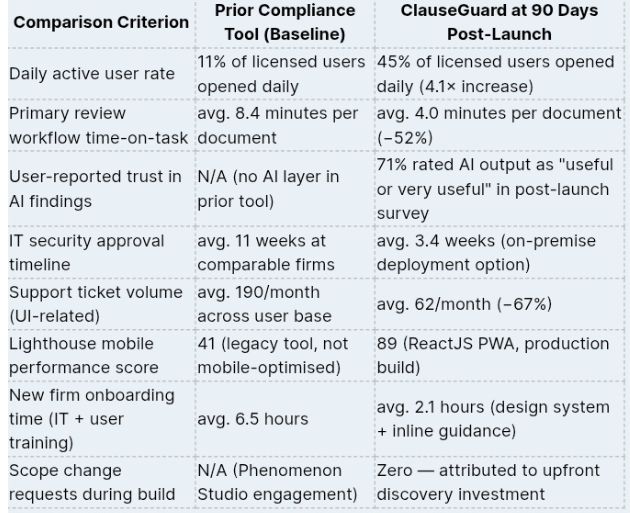
*Data sourced from ClauseGuard's Mixpanel analytics, client support logs, and Phenomenon Studio's 90-day post-launch monitoring report. Baseline calculated from client's own reporting on the prior tool across the same licensed user base.
Things Clients Ask Before Starting a LegalTech Build
These are the four questions that come up in almost every first conversation we have about enterprise SaaS in regulated industries.
How do you design a dashboard UI for legal professionals without overwhelming them?
Through a strict task frequency analysis and information hierarchy built around what the user needs to decide right now — not what data is available to display. For ClauseGuard's primary user type, we reduced the default dashboard view to seven visible data points. Support ticket volume dropped 67% in the first 90 days. Simplicity is not a preference in high-stakes professional tools. It is a productivity and trust mechanism.
What makes LegalTech brand identity different from standard SaaS branding?
Legal professionals are trained skeptics. Visual identity in this sector must communicate authority and precision without feeling antiquated. Generic SaaS aesthetics — bright gradients, playful illustration, rounded fonts — are actively counterproductive in a legal context because they signal "startup" to an audience that needs to trust a tool with their clients' confidential documents. The brand vocabulary of institutional trust is not aesthetic conservatism. It is a conversion strategy.
Can an AI chatbot be integrated into a legal compliance platform responsibly?
Yes — with explicit guardrails scoped in discovery, not added during QA. The ClauseGuard AI surfaces patterns, not legal conclusions. Every output carries a source citation and a confidence score. The AI never uses language suggesting its findings are legally definitive. These principles were agreed with the client's in-house counsel before a single model integration was built. Responsible AI in regulated industries is a product design discipline, not a disclaimer at the bottom of the terms page.
How does Phenomenon Studio handle outsourced web development for enterprise clients?
We front-load clarity. Every enterprise engagement begins with a discovery phase that produces a technical architecture document, a research summary, and a project charter before development starts. On ClauseGuard, this investment produced zero scope change requests across 14 weeks of active development — an outcome we achieve on approximately 78% of enterprise builds that begin with properly structured discovery.
The Lesson ClauseGuard Left Us With
We come away from every LegalTech engagement with the same reinforced conviction: the most valuable thing a design and development team can do in a regulated industry is resist the temptation to show everything the system can do. Restraint is not a limitation of ambition. It is the product of understanding that the user sitting in front of the screen has a job to do — and that your interface is either helping them do it or making it harder.
ClauseGuard became a tool that lawyers open first thing in the morning because we built it around what they actually needed to do in those first 20 minutes of their working day, not around the complete list of capabilities the platform possessed. The full capability set matters. The order in which you expose it determines whether anyone ever discovers it.
That is the discipline Phenomenon Studio brings to every web app design engagement — not a checklist, not a template, and definitely not a feature roadmap decided without user research. A genuine understanding of what the person on the other side of the screen is trying to accomplish, and an interface built to help them accomplish it with minimum friction. Everything else is decoration.
Media Contact
Company Name: Phenomenonstudio
Contact Person: Iryna Huk
Email: Send Email
City: New York
Country: United States
Website: https://phenomenonstudio.com/